
Enterprise Network Infrastructure Services in Qatar: The Complete Architectural & Implementation Guide
In an era characterized by rapid digital acceleration, high-density cloud integration, and connected smart spaces, network infrastructure is no longer merely a background utility. It serves as the central nervous system of any enterprise. From high-rise financial offices in West Bay and commercial developments in Lusail Marina to industrial facilities across Mesaieed and Ras Laffan, modern businesses run on continuous, low-latency, and highly resilient connectivity.
Every mission-critical application deployed today—whether an Enterprise Resource Planning (ERP) platform, Unified Communications (VoIP and video teleconferencing), high-definition IP surveillance, smart building automation, or customer-facing portals—depends directly on the underlying physical and logical network fabric.
Yet, as businesses grow, their network demands evolve exponentially. Adding ad-hoc switches, deploying unmanaged consumer-grade access points, or ignoring structured containment pathways inevitably leads to chronic bottlenecks, severe packet loss, intermittent disconnects, and alarming cybersecurity blind spots.
Partnering with an experienced provider of network infrastructure services in Qatar is the most effective way to eliminate operational risks, maintain compliance with local regulations, and build an infrastructure ready for the future. This comprehensive guide breaks down the core architecture, regional engineering hurdles, deployment methodology, and strategic value of enterprise networking designed specifically for Qatar’s commercial ecosystem.
What Defines Enterprise-Grade Network Infrastructure?
Enterprise network infrastructure is an orchestrated, multi-layered system designed to deliver continuous data transmission, automated failover, ironclad security, and granular administrative control. Unlike small office setups that depend on standalone router-modem combinations, enterprise architecture is partitioned into modular, highly dependable layers.
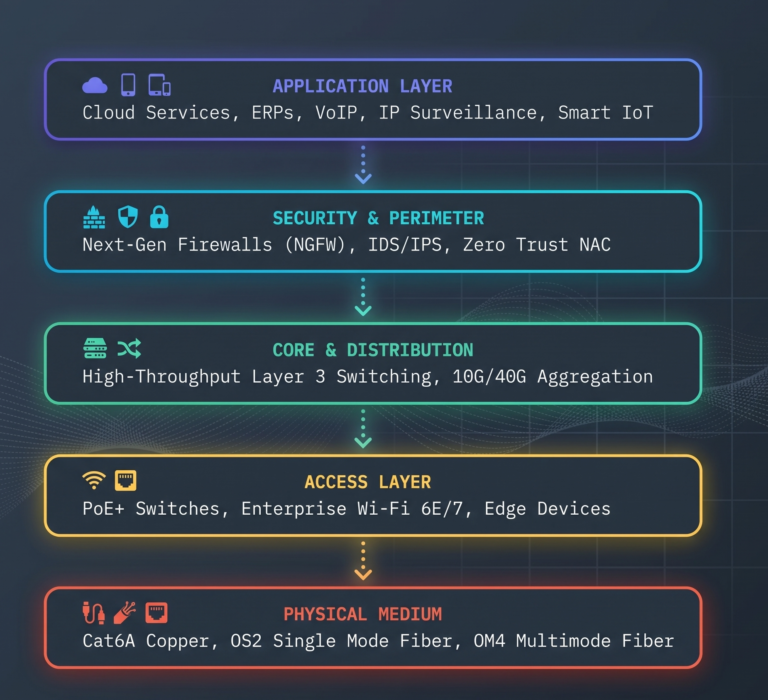
To function reliably under peak load, an enterprise network requires five foundational layers:
- The Physical Transmission Medium: The physical bedrock consisting of structured copper (Cat6/Cat6A), optical fiber backbones, patch panels, server cabinets, cable management trays, and standardized termination jacks.
- The Core and Distribution Layer: High-speed Layer 3 backbone switches that route data between isolated local area network segments, data closets, and external gateways at wire speed without introducing packet delay.
- The Edge Access Layer: Power-over-Ethernet (PoE/PoE+) switches that connect client workstations, IP desk phones, biometric access points, and wireless access nodes, dynamically applying security profiles to every active port.
- The Wireless Access Network (WLAN): High-capacity enterprise access points managed through centralized cloud or hardware controllers to facilitate smooth, uninterrupted roaming across vast floor plans.
- The Perimeter and Defense Gateway: Next-Generation Firewalls (NGFW), Intrusion Detection/Prevention Systems (IDS/IPS), virtual private network (VPN) gateways, and software-defined WAN (SD-WAN) appliances that protect private networks from outside threats.
Key Architectural Pillars of Modern Network Design
Building an enterprise network without a strict architectural blueprint is one of the most expensive mistakes a business can make. Below are the architectural pillars that govern high-performing enterprise networks across Qatar.
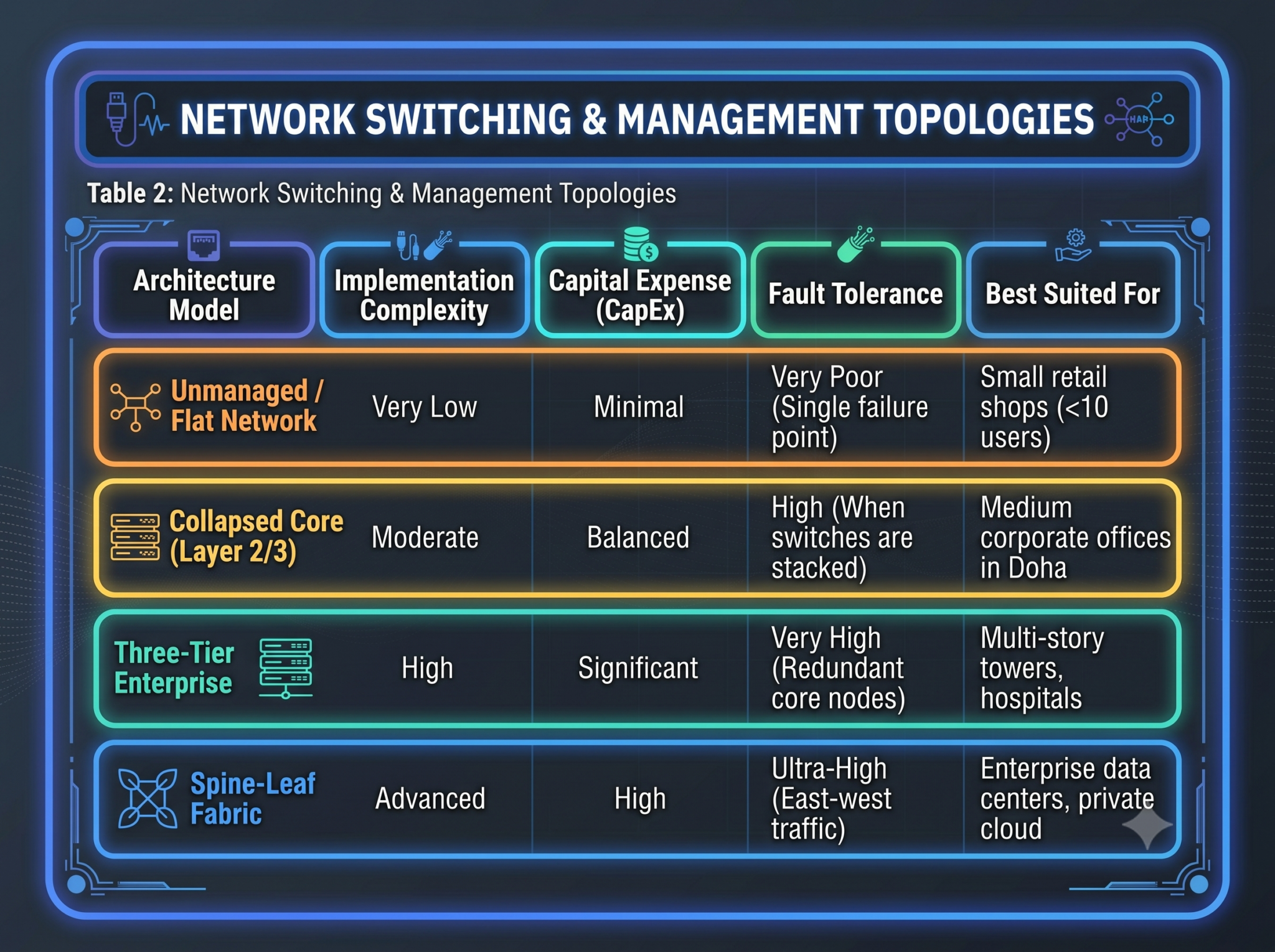
1. Hierarchical Three-Tier vs. Collapsed Core Architecture
In sprawling multi-floor offices or multi-building campus layouts, networks traditionally implement a classic three-tier architecture: Core, Distribution, and Access.
- The Core Layer acts as the high-speed transit backbone, designed purely for rapid packet switching without packet inspection.
- The Distribution Layer aggregates access switches, enforces Access Control Lists (ACLs), manages inter-VLAN routing, and routes traffic efficiently.
- The Access Layer connects endpoints directly into the network.
For small-to-medium enterprises (SMEs) or single-floor offices in commercial towers, engineers frequently implement a Collapsed Core Architecture. Here, the core and distribution functions are merged into redundant, high-capacity Layer 3 switches, significantly reducing initial hardware expenditure without sacrificing throughput, routing speed, or resilience.
2. Network Segmentation and Virtual Local Area Networks (VLANs)
A flat network—where all devices communicate within a single broadcast domain—is an operational and security hazard. A single broadcast storm or infected laptop can take down the entire corporate system.
Professional network design divides traffic into logically isolated VLANs:
- Corporate Staff VLAN: Authenticated network access for internal laptops and corporate workstations with access to internal file shares.
- VoIP & Telephony VLAN: High-priority traffic configured with strict Quality of Service (QoS) rules to eliminate audio jitter and dropped calls.
- IP Surveillance & Access Control VLAN: Completely isolated from public access, ensuring video feeds and security logs cannot be tampered with.
- Guest Wi-Fi VLAN: Isolated direct-to-internet traffic, firewalled entirely from internal enterprise databases, printers, and administration consoles.
- Server & Management VLAN: Heavily restricted subnet accessible only via multi-factor authentication (MFA) by designated network engineers.
3. Redundancy, High Availability, and Link Aggregation
Enterprise infrastructure cannot depend on a single point of failure. Downtime translates directly to financial and operational losses. Professional deployments integrate:
- Dual WAN / Multi-Homing: Combining fiber internet feeds from local telecom providers (Ooredoo and Vodafone Qatar) with automatic BGP or SD-WAN failover.
- Link Aggregation Control Protocol (LACP): Bundling multiple physical network connections into a single logical trunk link. This doubles or quadruples backhaul bandwidth while ensuring immediate, hitless failover if a single cable or port fails.
- Virtual Router Redundancy Protocol (VRRP): Ensuring default gateway addresses transfer instantly to a backup core switch if the primary switch encounters an outage.
Environmental & Regulatory Engineering Realities in Qatar
Designing and deploying network infrastructure in the State of Qatar requires specialized engineering that accounts for the local climate, construction methods, and regulatory frameworks.
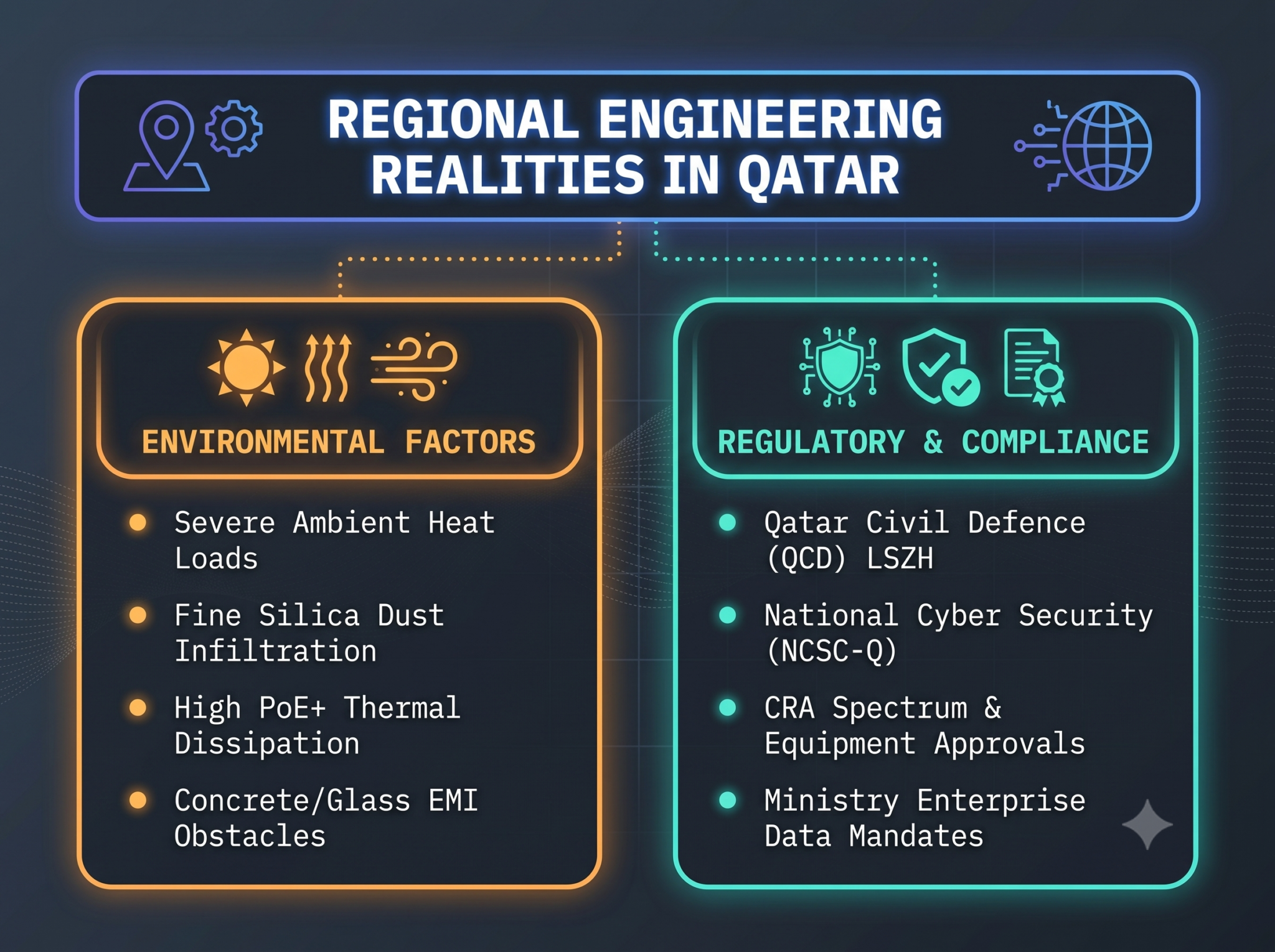
1. Managing Ambient Thermal Load and High-Power PoE
Qatar experiences sustained periods of extreme outdoor temperatures. While primary server rooms benefit from dedicated precision cooling (PAC) systems, network edge switches often sit inside ceiling plenums, electrical closets, or riser shafts where temperatures can fluctuate drastically.
Furthermore, with the rise of PoE+ (802.3at) and PoE++ (802.3bt) providing up to 60W or 90W of direct electric current across network cables to run motorized PTZ security cameras, smart lighting, and high-performance Wi-Fi access points, cable bundles heat up internally. Inadequate heat dissipation causes high cable attenuation, packet loss, and premature component breakdown. Engineers must deploy proper containment spacing, temperature-monitored racks, and high-specification Cat6A cabling with tested thermal tolerances.
2. Silica Dust Particulate Control
Fine desert dust is present across all urban environments, especially in expanding districts like Lusail, Al Wakrah, and the Industrial Area. When dust enters active network equipment:
- It blankets internal motherboards and power units, insulating heat and causing fans to spin at maximum RPMs until they burn out.
- It contaminates optical fiber transceivers and LC/SC patch interfaces, causing optical signal loss (high dB attenuation).
Professional network infrastructure services address this through IP-rated dustproof wall cabinets for semi-industrial sites, specialized dust covers for unused RJ45 and SFP ports, and rigorous cleanroom fiber cleaning procedures using high-grade isopropanol and scope-inspection before any connection is completed.
3. Fire Safety and Qatar Civil Defence (QCD) Compliance
Building codes across Qatar mandate strict fire and life safety protocols. Standard network cables wrapped in traditional Polyvinyl Chloride (PVC) release dense, black smoke and toxic, corrosive halogen gas when burned.
Qatar Civil Defence regulations require commercial facilities to install Low Smoke Zero Halogen (LSZH) jacketed copper and fiber optic cabling. During a fire, LSZH cables emit minimal light-blocking smoke and zero acid-producing halogens, preserving visibility for evacuation and preventing acidic gas from corroding surrounding electronics.
4. Communications Regulatory Authority (CRA) & Security Compliance
Active networking hardware—especially wireless enterprise access points, microwave point-to-point links, and high-encryption firewalls—must comply with the equipment approval guidelines enforced by the Communications Regulatory Authority (CRA) of Qatar. Network designs must utilize approved radio frequency bands to prevent interference with public communications and critical national infrastructure.
Additionally, infrastructure handling government, financial, or sensitive enterprise records must adhere to the data privacy and security controls issued by the National Cyber Security Agency (NCSA) of Qatar, ensuring data streams are segmented and encrypted at rest and in transit.
Comparative Evaluation: Architecture, Media, and Topologies
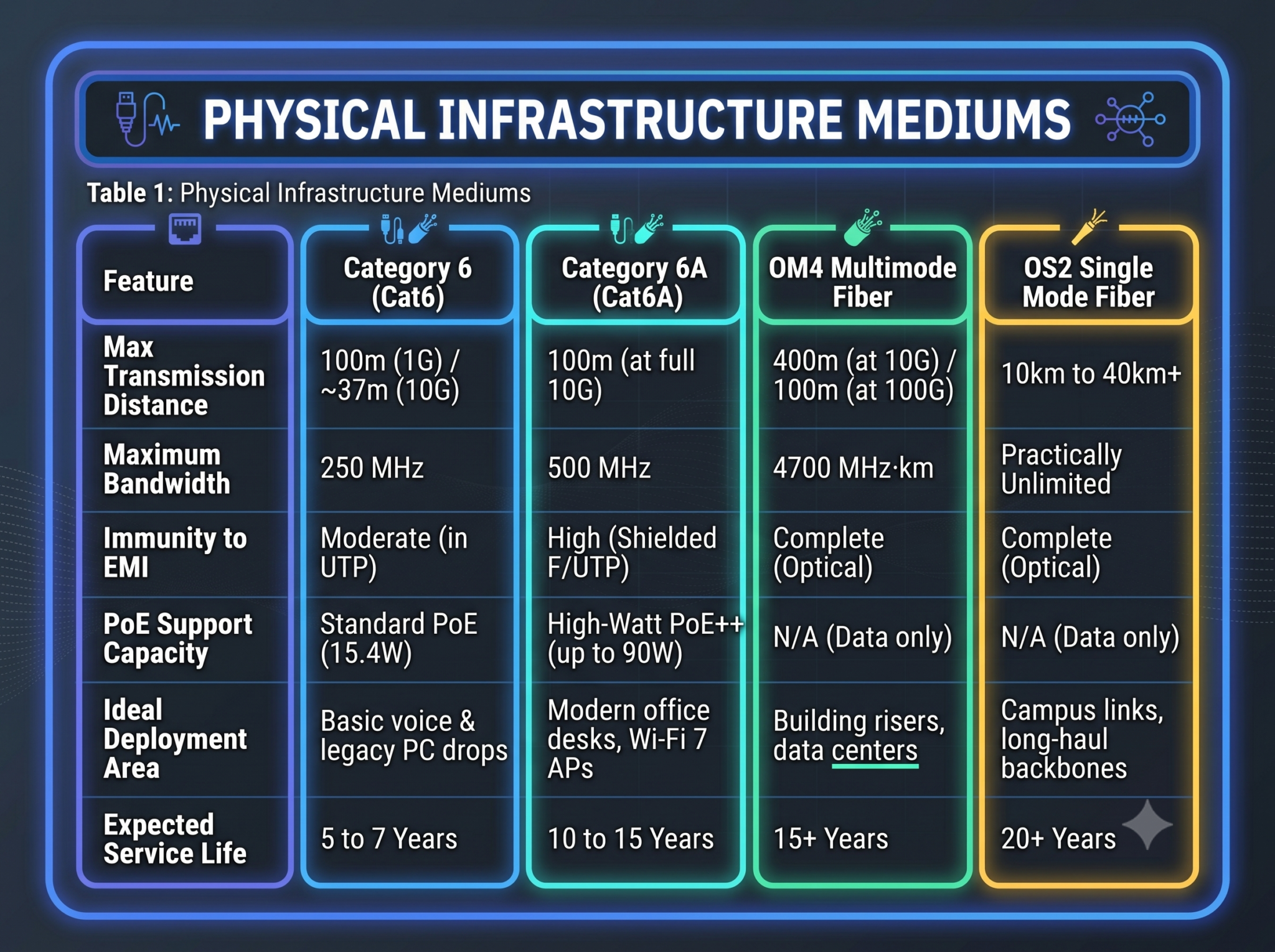
Selecting the right hardware architecture and media types requires balancing performance needs against budget limitations. The tables below outline the key parameters that guide modern enterprise deployments.
Step-by-Step Methodology for Network Infrastructure Implementation
Delivering an enterprise-grade network requires a structured implementation lifecycle. Following a disciplined deployment model ensures projects finish on schedule, within budget, and in full alignment with engineering specifications.
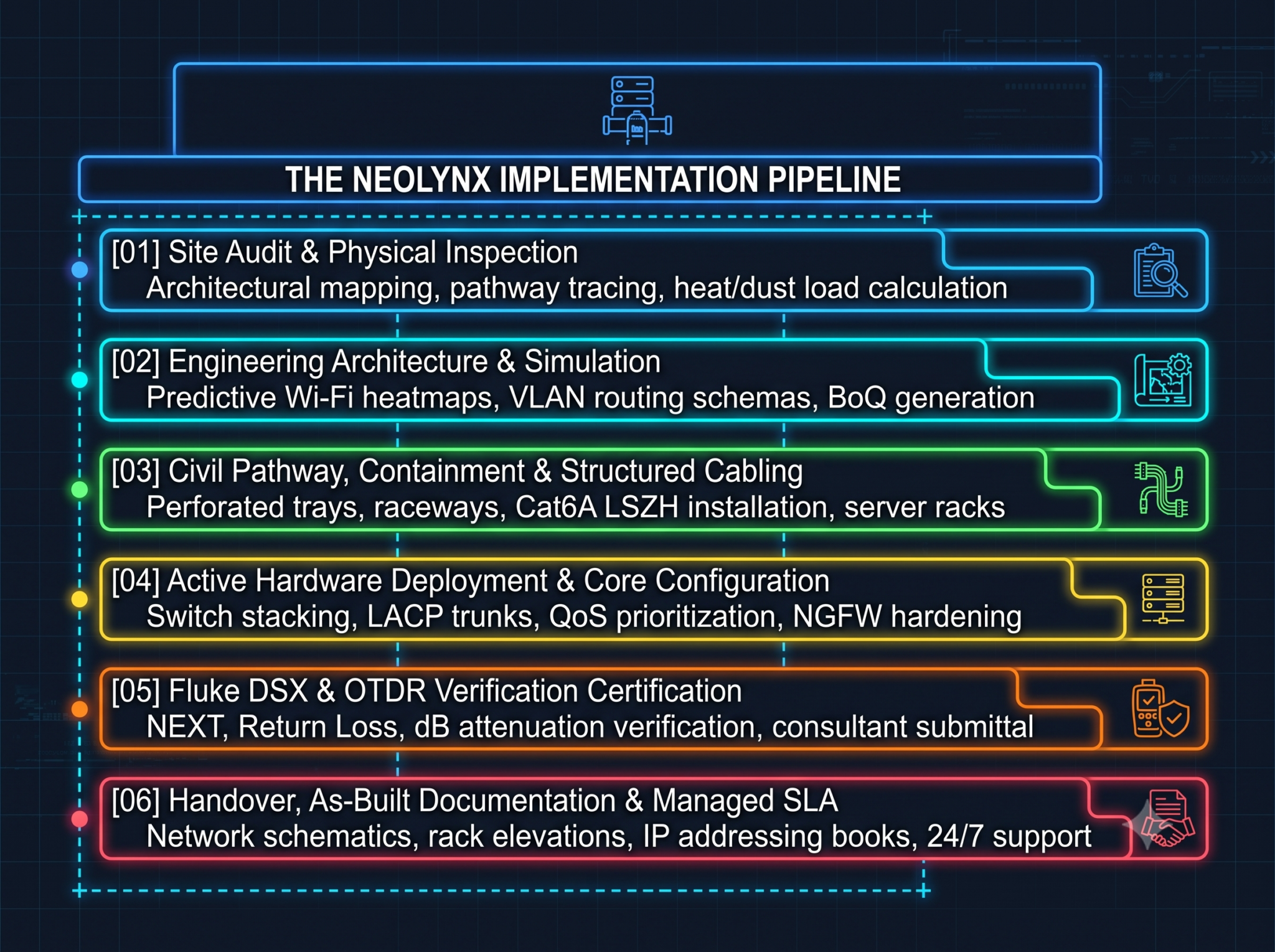
Step 1: Comprehensive Site Survey & Environmental Audit
Every project begins on-site. Field engineers inspect the physical facility to evaluate:
- Containment pathways, riser shaft space, and ceiling void heights.
- Ambient temperature ranges and air circulation inside proposed server closet locations.
- Concrete wall density and reflective architectural materials (such as glass partitions) that impact wireless signal attenuation.
- Power supply availability, ensuring dedicated isolated circuits exist for Uninterruptible Power Supply (UPS) systems.
Step 2: Predictive Modeling and Topology Engineering
Before ordering a single piece of hardware, engineers design the logical and physical topologies:
- Predictive Wi-Fi Heatmapping: Using industry-standard planning tools to simulate wireless signal propagation across architectural blueprints, determining the exact number and placements of access points needed to prevent 5GHz and 6GHz dead zones.
- Traffic Flow Engineering: Designing the IP addressing architecture, subnet boundaries, and inter-VLAN routing tables.
- Component Specification: Generating a comprehensive Bill of Quantities (BoQ) specifying certified components that comply with client requirements and local safety codes.
Step 3: Passive Infrastructure & Structured Containment
With designs approved, installation crews install the passive physical layer:
- Installing perforated metal cable trays, wire baskets, and fire-stopped floor penetrations.
- Pulling LSZH-jacketed Cat6A copper drops and multi-strand optical fiber backbones following strict minimum bend-radius and maximum pulling-tension rules.
- Assembling floor-standing or wall-mounted server cabinets with high-efficiency fan units, horizontal and vertical cable management rings, and dedicated grounding busbars.
- Punching down connections onto modular patch panels, using color-coded jacks and consistent ANSI/TIA-606-B labeling schemes.
Step 4: Active Hardware Configuration and Hardening
Systems engineers configure, stage, and mount the active networking hardware:
- Switch Stacking: Stacking distribution switches using dedicated high-speed DAC (Direct Attach Copper) cables to create a single logical management entity with shared backplane capacity.
- Trunking and VLAN Tagging: Setting up 802.1Q trunk links across switches and mapping dynamic port-profiles to edge ports.
- QoS Optimization: Allocating guaranteed bandwidth pools for low-latency traffic, ensuring voice and video packets take precedence over background file transfers.
- Firewall Hardening: Defining stateful firewall rules, enabling IPS signatures, activating automated threat feeds, and establishing secure SSL-VPN endpoints for remote workforces.
Step 5: Rigorous Testing, Fluke Certification, and Commissioning
No network installation is complete without empirical performance validation:
- Fluke Copper Certification: Every single Cat6/Cat6A run is tested using a Fluke DSX CableAnalyzer, verifying that parameters like Near-End Crosstalk (NEXT), Return Loss, Wiremap, and Propagation Delay meet international standards.
- OTDR Optical Testing: Fiber strands undergo Optical Time Domain Reflectometry (OTDR) analysis to ensure each fusion splice and connector interface operates with minimal optical decibel loss.
- Throughput and Failover Stress Testing: Technicians manually simulate primary line cuts and switch failures to confirm that high-availability protocols (such as VRRP and LACP) execute failovers cleanly without dropping active user sessions.
Step 6: Handover, Documentation, and Lifecycle Support
The final stage delivers full operational transparency to the client’s internal IT team:
- Delivering comprehensive As-Built Documentation, including physical cable route drawings, rack elevation diagrams, patch panel assignment schedules, and complete IP allocation tables.
- Providing the official Fluke and OTDR certification test results in PDF format for MEP consultant approval.
- Transitioning the site into a proactive service level agreement (SLA) with 24/7 monitoring, automated alerts, and routine firmware update schedules.
Common Enterprise Networking Pitfalls to Avoid
Even substantial investments can underperform if basic deployment errors slip through. Understanding these frequent mistakes helps project managers protect their infrastructure investments.
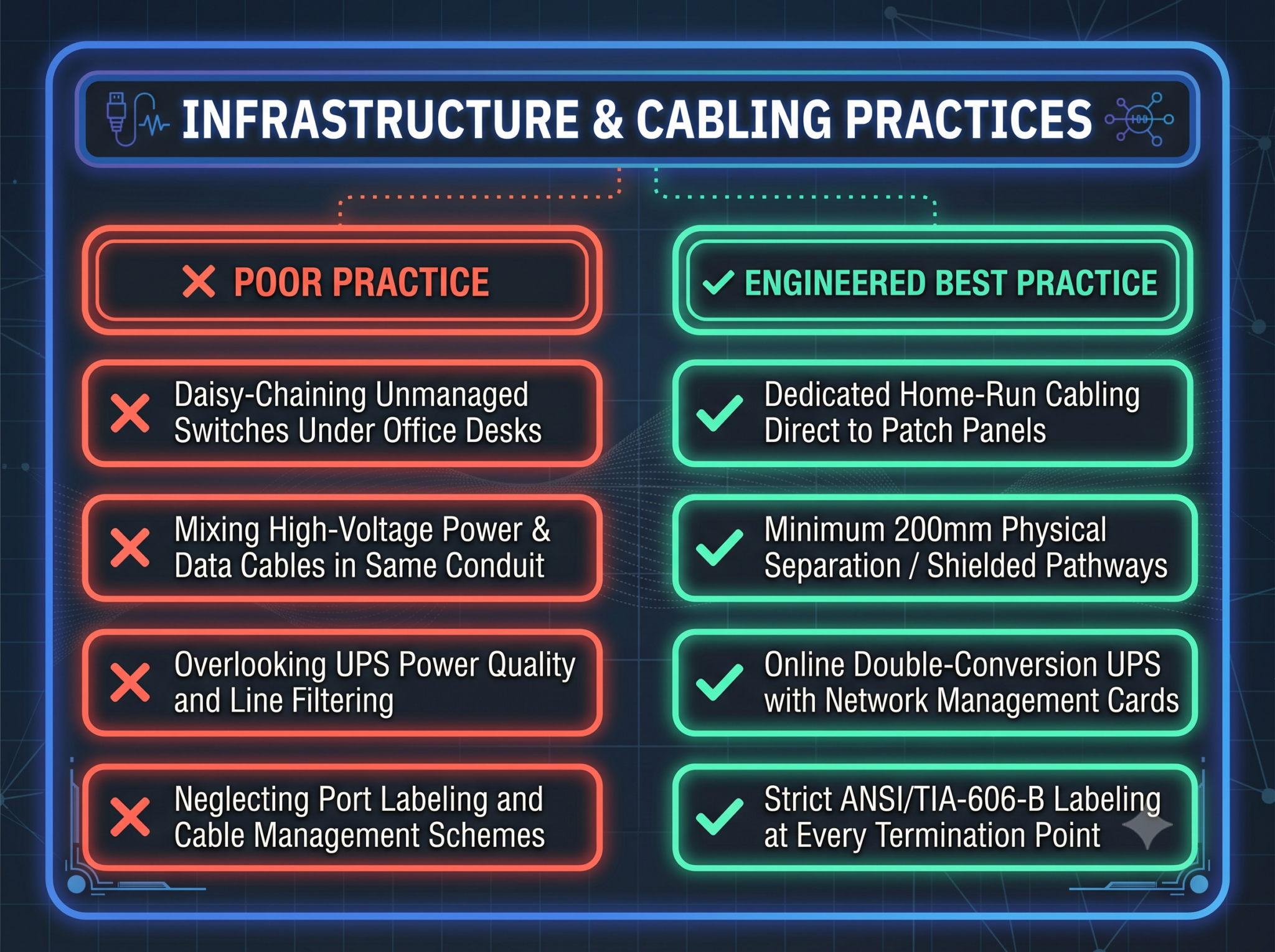
Pitfall 1: Daisy-Chaining Unmanaged Switches
When an office outgrows its original wall ports, teams are often tempted to drop an inexpensive 8-port unmanaged switch under an employee’s desk. This practice introduces unmonitored points of failure, creates hidden loops that trigger broadcast storms, and strips away the IT department’s ability to manage traffic prioritization and port security.
Best Practice: Always pull dedicated home-run cables from the central patch panel to every workstation location, or deploy manageable edge switches with full VLAN and STP (Spanning Tree Protocol) visibility.
Pitfall 2: Running Data Along High-Voltage Electrical Lines
In fast-paced commercial fit-outs, contractors sometimes run network cables through the same conduits or containment trays as high-voltage 240V/415V electrical lines to save ceiling space. The electromagnetic fields generated by electrical wiring induce heavy noise on copper data cables, leading to corrupt frames, lost packets, and mysterious drops in speed.
Best Practice: Maintain a minimum separation distance of 200mm between unshielded data runs and high-voltage power conduits, or install fully shielded (F/UTP or S/FTP) Cat6A lines alongside grounded metal dividers.
Pitfall 3: Neglecting Clean Power Backups
In enterprise environments, standard line-interactive consumer UPS units do not provide adequate protection. Momentary transfer times and harmonic electrical noise can cause sensitive core switch processors and VoIP controllers to freeze or reboot.
Best Practice: Deploy true Online Double-Conversion UPS systems equipped with SNMP network management cards. These systems continuously convert incoming AC power to DC and back to pure sine-wave AC, shielding sensitive networking equipment from voltage sags, power surges, and frequency fluctuations.
Pitfall 4: Neglecting Structured Labeling and Cable Dressing
Leaving patch panels without labels and letting patch cords become a tangled mess makes ongoing management a nightmare. A messy server rack turns minor troubleshooting steps into hour-long operational outages whenever a technician needs to trace or replace an individual drop.
Best Practice: Enforce strict ANSI/TIA-606-B compliant labeling at both ends of every cable run, on patch panel ports, and on faceplates. Use tidy horizontal and vertical cable managers with color-coded patch cords to keep pathways clean and maintain airflow across switch exhausts.
Key Business Benefits of Modernizing Your Network Infrastructure
Upgrading your enterprise network infrastructure delivers clear, measurable operational returns:
- Substantial Reduction in Downtime: Redundant links, enterprise hardware, and automated failover paths eliminate single points of failure, saving organizations from expensive operational halts.
- Higher Employee Productivity: High-speed switching and modern Wi-Fi eliminate buffering during video conferences, accelerate file transfers to cloud repositories, and keep local applications responsive.
- Integrated Cybersecurity at the Edge: Modern network switches automatically quarantine infected laptops, prevent unauthorized access to physical ports via 802.1X authentication, and restrict lateral movement across the internal network.
- Simple, Predictable Scalability: Modular patch systems and scalable core switches allow growing businesses to add new team members, deploy new surveillance cameras, or introduce IoT equipment without redesigning the entire network.
- Lower Total Cost of Ownership (TCO): High-spec Cat6A and fiber infrastructure typically serves an organization for over a decade. Doing it right from day one prevents costly ceiling teardowns, emergency weekend rewiring, and repetitive hardware swaps down the road.
The Neolynx Solutions Advantage in Qatar
Neolynx Solutions provides end-to-end technology and connectivity services for businesses across Qatar. Our networking division handles every phase of network deployment, combining technical engineering expertise with local delivery capabilities.
Our network infrastructure services include:
- Turnkey Office Fit-Out Networking: Structured cabling, patch panels, cable raceways, server racks, managed switching, and secure Wi-Fi access designed specifically for new commercial spaces in Doha and Lusail.
- Core Network Upgrades & Re-Architecting: Transitioning outdated, flat corporate networks to high-speed, segmented Layer 3 environments equipped with next-generation firewall protection.
- Industrial & Campus Backbone Connectivity: Deploying armored single-mode and multimode optical fiber backbones with on-site fusion splicing and OTDR certification across industrial and campus sites.
- Managed Network Services & Maintenance: Scheduled firmware updates, proactive configuration backups, continuous hardware health monitoring, and rapid on-site emergency troubleshooting.
Frequently Asked Questions (FAQ)
How do I determine if my company should install Cat6 or Cat6A cabling?
Cat6 supports speeds up to 1 Gbps over 100 meters, but it can only handle 10 Gbps over shorter distances (37 to 55 meters) and remains susceptible to alien crosstalk. Cat6A operates at double the bandwidth frequency (500 MHz) and guarantees full 10 Gbps performance across the entire 100-meter run. For new office installations in Qatar—especially setups utilizing Wi-Fi 6E/7 access points or multi-gigabit workstations—Cat6A is the recommended standard for long-term reliability.
Can we run our security cameras and data networks on the same physical infrastructure?
Yes, modern networks routinely converge voice, data, and security surveillance onto a shared physical cabling infrastructure. However, they must be separated logically. By configuring dedicated VLANs and applying strict Quality of Service (QoS) rules, high-definition video streams run smoothly on their own protected subnet without consuming bandwidth needed for day-to-day office computing.
Why is Low Smoke Zero Halogen (LSZH) cabling required in Qatar?
Qatar Civil Defence (QCD) mandates LSZH materials in commercial facilities to maximize life safety during emergencies. Standard PVC cabling emits dense, toxic, and highly acidic smoke when exposed to fire, which impairs visibility during evacuations and damages sensitive equipment. LSZH cables minimize smoke emission and release no harmful halogens when burned.
What documentation should an enterprise demand upon project completion?
Every professional network implementation should conclude with complete As-Built Documentation. This includes detailed floor plans showing all cable drops, full rack elevation diagrams, complete patch panel schedules, switch port-mapping matrices, and certified Fluke DSX/OTDR test reports verifying the electrical and optical health of every installed line.
Build Your Enterprise Network on a Solid Foundation
Your network infrastructure forms the digital foundation for your organization’s day-to-day work and future growth. Cutting corners on cable standards, deploying unmanaged network hardware, or skipping professional testing leads to recurring technical headaches, productivity drops, and costly downtime.
Whether you are designing the network for a new corporate facility in Lusail, upgrading your server rooms in West Bay, or deploying an industrial communication backbone in Mesaieed, Neolynx Solutions provides the engineering experience, tier-one hardware, and local field support you need to build with confidence.
Ready to upgrade your enterprise network infrastructure in Qatar?
Speak with our certified network engineering team at Neolynx Solutions today.
- Direct Phone: +974 40391539
- Corporate Office: Old Airport Road, Street 902, Zone 47, Doha, Qatar
- Email Inquiries: info@neolynxsolutions.com
- Website: neolynxsolutions.com
Schedule an on-site survey and infrastructure assessment today to give your business the speed, reliability, and security it deserves.
